2007-08-19

Textures, Colors, and Bits

There's a lot of talk these days about how much space is needed to store texture data for the latest generation of game consoles. As while the Wii and the Xbox360 have stuck with the tried and true DVD format (4.7GB single layer, 8.5GB dual layer), the PS3 has gone with BluRay which provides 25 GB single layered and 50 in dual layer. Some developers are claiming to be maxing out the potential of the DVD (not to be confused with HD-DVD), however I'm willing to bet that about 98% of the time, this is simply due to poor compression and color palette use (note: I'm certainly no expert on all of this...just thinking out lout here).

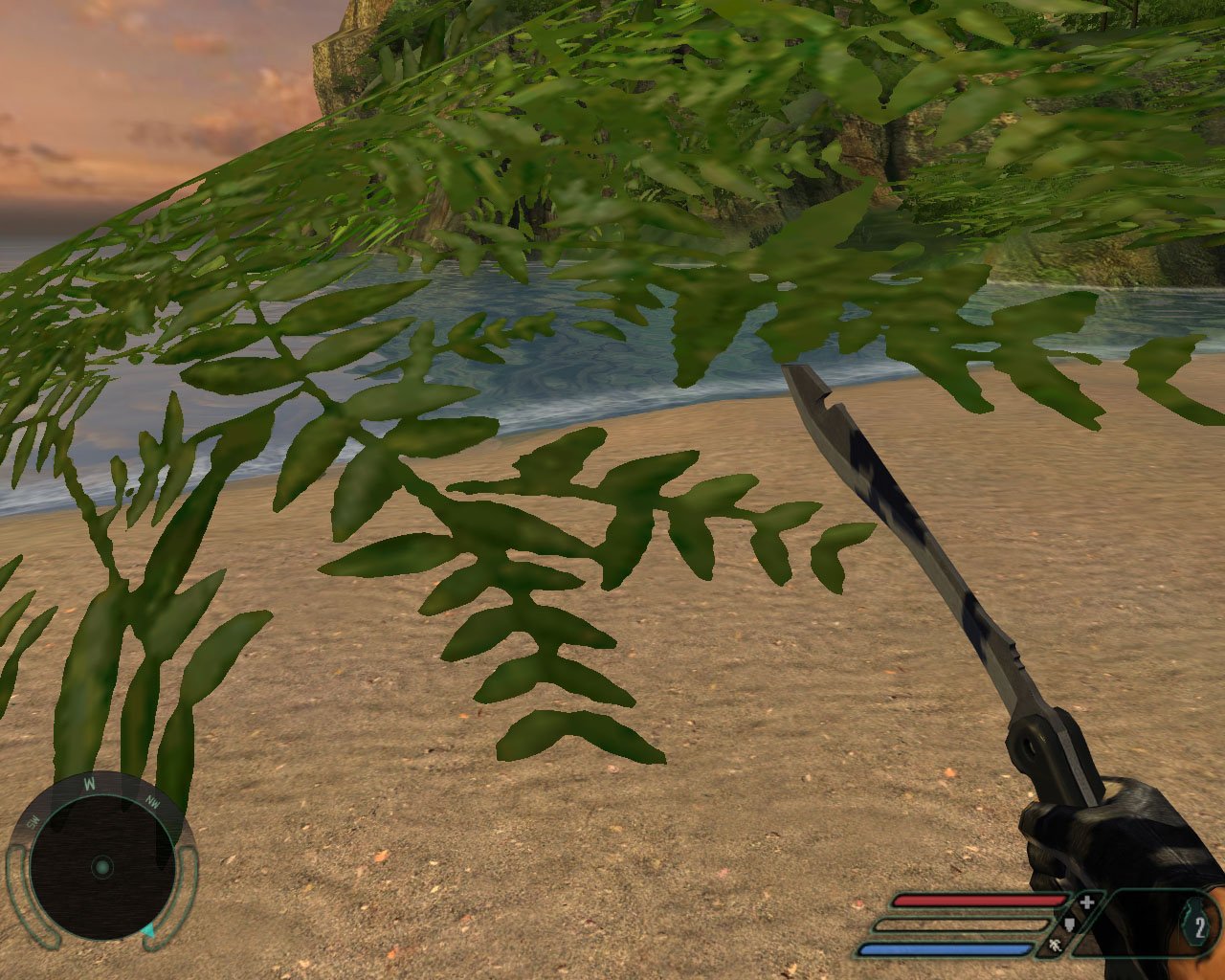
Even though we now have a small, but growing number of TVs and monitors than can support beyond 24bit color, this does not mean every single texture needs to be stored with such a high color palette. Now beyond the Red, Green and Blue channels, you'll also want to store a "alpha" (or transparency) channel. This will bump some textures up to 32bits. However, giving up 8bits per pixel of your textures to memory can eat up alot of space and be quite wasteful, so some will only use a single bit for transparency, putting them in an either-or situation. This second method while much more efficient in terms of storage and processing required to render it in the scene looks absolutely awful most of the time. You find this 1bit alpha used most often in the textures for leaves, blades of grass, or a chain linked fence...all of which look absolutely awful because they cause so much aliasing that it appears the areas they're used in heavily together causes a shimmering, sparkling effect which can be quite irritating to the eye. Also since most modern anti-aliasing techniques strictly affect the polygons, and not your textures in the scene this becomes even more apparent as it makes these items stand out even more from the rest of the scene.

With the ultra powerful CPUs and GPUs found in the 360 and PS3 the processing power needed to render an 8bit alpha vs. a 1bit alpha is almost negligible at this point. However, as I started off talking about, it can make quite a difference in the amount of space required to store your textures, whether it be in memory or the physical storage media. With the higher and higher resolutions of todays textures, multiplied by a growing number of them with modern graphics engines using sometimes 8 or even 16 different textures across just one area on a model, those 7 little bits add up pretty quick.

The thing that has always puzzled me is why no one uses anything in between? The difference between a 1bit mask and an 8bit mask is very apparent, but the difference between a 2 or 3 bit mask compared to an 8 bit is not nearly as much.

side-by-side comparison


Looking at them close up makes the differences more apparent, but it also makes it more clear how much we don't really need to use a full 8bit mask for decent alpha when it comes to edge aliasing.

First up, is a 4 times magnified close up of the 8bit mask:

doodle-8bit


And then look at the 1bit's very visible difference.

doodle-1bit


However, now look at the 2bit example. It's not quite as nice as the 8bit, but a huge improvement over the 1bit...

doodle-2bit


And if we bump that up to 3bit there's even less of a difference.

doodle-3bit


I had also originally made a 4bit example as well, but there was practically no difference between it and the 8bit example at all.

Now I want to point out that for all of this I am focusing on textures that have obvious aliasing problems, like a chainlinked fence, or leaves on a tree. For other effects like smoke, fire, or maybe even hair this may not work as well and you may still need to use 8bit to look good, but then again... maybe not? ;)

So, usually a texture map is going to be stored with either with 8, 16, 24, or 32 bits (due to byte addressable memory mainly I would assume). An 8bit texture is going to only give you an indexed palette of 256 colors, or 255 if you use 1 of those colors as your transparent color. If we take 2 of those bits and set them aside for transparency (giving 4 levels of transparency) we now get 64 colors that each can be displayed at 4 levels, or even 5 if you reserve one of those colors for absolutely transparent as with the usual scheme. Generally this is still plenty of different colors for a mainly monochromatic thing like a leaf or blade of grass.

However, let's say you need more colors. Let's look at a 16 bit texture, which in most instances is perfectly fine for even high quality graphics. Now we can use an indexed palette like with the 8bit image, and that will follow almost the same principles. Let's look at using a RGB scale instead. Once again, many times people will use 5 bits for each color channel and then the extra bit for transparency [RGBA5551], which gives us the same problems as with the 255+1 color image and aliasing. What if we bump down each color channel to 4bits, and now we have 4 bits for the transparency channel as well (16 levels of transparency) [RGBA4444]. As we've already determined, that's more than enough for the issue we're looking at, but it does cut into your number of possible colors by quite a bit. Perhaps, with a 16bit texture, you'd still be best off to use a static palette, with 2 or 3 bits set aside for transparency? It would probably depend on what type of texture you're working with individually.

So okay, let's look at 24bit textures, which rarely have an alpha channel at all. Here the solution seems very obvious, cut your color channels down to 7bits rather than 8, and then use the remaining 3bits for alpha [RGBA7773].

Generally however, if you want 24bit color textures, and transparency, you just bump on up to 32bits...which once again, may or may not be a waste depending on what type of texture it is your working with. As most TVs and monitors still can not display anything higher than 24bit color (don't let your Windows display settings fool you guys, there is no such thing as a 32bit monitor), some of the newer displays will actually go up to 30bit (10 per channel) and 36bit (12 bits per channel) which is only available to you if you're using HDMI v1.3+ or DisplayPort1.1+. In such a case (which I doubt anyone at all will even consider till the next generation of systems) we could have a 32 bit texture using 10 bits for each color channel and 2 bits for the transparency, or maybe a 40bit (next byte addressable size up) with 12bits per color channel and 4bits for transparency. However, most developers will probably opt to start using floating point based color channels ending up with 48 and 64 bit textures, which will take even more space...

Another interesting point I'd like to point out while I have your attention is that rather than using a 32bit texture for super high quality color representation, why not use a 16bit texture thats twice the resolution or more, yet uses about the same space? When the texture is filtered through mipmapping and various other filters, you probably won't even be able to tell the difference at a distance, yet up close you've got even more detail then before ;)

I guess the point of all this is that today's developers don't seem to care to try and be as creative about such problems as they used to be a decade ago. If you think squeezing all those textures onto a DVD is hard, try putting them on a 16 megabit SNES cartridge... If you spend just a little more time thinking about these kinda things, I'm sure that you'll be able to fit just about as much detail into that 9 gig DVD as you have planned to plop onto that BluRay disc. The same goes for audio (10 gigs my ass, that must be uncompressed or something...have these guys never heard of Ogg Vorbis?).

2007-07-22

The GPU's days are numbered

I just saw an article with a quote from John Carmack about how he doesn't think there's a real need for a dedicated phyics processor (PPU) like the Ageia PhysX. He says that between the advancement of multi-core CPUs and GPUs they should be able to handle physics just as well in the near future. This is not the first time I've heard this sentiment, but it has brought back an old thought in my mind. How much longer will it be till the GPU suffers the same fate?

When dedicated graphics processors (predominantly used for 3D graphics) were first introduced in the mid-late 1990s, there was certainly a need for them. They allowed game developers to create a new level of graphical quality that would not have been possible strictly using the general purpose CPU. However, that didn't stop Intel from developing MMX (multi-media extensions) for their Pentium chip line. The idea was that for those that wanted decent 3D graphics, but didn't have to have the best of the best, their new assembly commands built into their chips would allow for mainstream use of 3D. Some tried, but in the end it just wasn't enough to compete with even a low-end dedicated 3D processor. When NVidia released the GeForce 2, the world's first GPU with the ability to perform realtime lighting and deformations, it was all over. Later cards would introduce the capacity to have fully programmable shaders thus moving the GPU and CPU even further apart.

Today it seems the progression of GPUs has started to plateau, just as CPUs had a few years ago prior to the multi-core revolution. It is already predicted that 3d graphics chip makers will begin to follow suit with multi-core GPUs in the next couple years. However, I'm much more interested in another route AMD is planning to take. They have announced a future CPU called the "hybrid." This multicore CPU will also feature an on-die GPU. Details are sketchy at best beyond that...so people like me are left to allow our imaginations to run wild with the idea.

Now, AMD has tried to make it clear that the graphical quality of such a setup will be comparable to current on-board IGP solutions from their ATI division. But that certainly doesn't mean things won't progress beyond that in future itterations. Imagine an AMD hybrid chip featuring 4 of their next generation Phenom CPU cores, with an additonal 2 ATI 3D GPU cores...all on one chip. Now think about if they take it one step further and start integrating some of the same features of their GPUs directly into their CPU's cores.... Then instead of the 6-core hybrid setup I described before, now you can have a 4 or 8 core CPU that has built in 3d and 2d graphics hardware capabilities built right into a general purpose CPU.

Now, I'm not a hardware/processor expert by any means, but from what I understand, one of the biggest differences between standard, general purpose CPUs and 3D GPUs today is the ability to use Vectors instead of just the usual integers and floating point numbers. AMD has already included this ability into their upcoming K10 chips, so we'll already be partially there come this fall. Having hardware vector processing in the CPU will also help confirm what Mr. Carmack thinks about PPUs.

To sum it up, I think Intel's ideas behind adding MMX to their Pentium Pro and Pentium 2 chips over a decade ago was just a little too far ahead of its time. If things continue to progress the way they have over the last few years, we might see the dedicated graphics processor go the way of the sound card. Sure, there will always be a few people who just have to have a higher end experience, but for the vast majority of people, a future generation of CPU may be able to handle all their processing needs.

I could end this article right here, but there's something else to think about if you follow my line of thinking. There are hundreds of processor and chip producing companies...however, it's really only 4 companies that make the bulk of them used in Desktops, Laptops, and non-portable gaming systems: Intel, AMD, IBM and NVidia. Now until recently, that list would have featured 5 companies, but as you should already know, AMD bought out ATI last year. With ATI and NVidia being the only 2 companies that mattered when it came to GPUs, that leaves NVidia alone now as the only strict GPU and chipset producer in this bunch. Intel already has its own line of GPUs too, however most people still find them to be highly inadequate when compared to NVidia and AMD/ATI's offerings. Also, now that AMD and Intel have bumped IBM out of the Desktop/Laptop world, thanks to Apple, they're also in an interesting situation. If I remember correctly, IBM even sells some of its servers featuring AMD chips now, so really for IBM their business model isn't quite so focued on chip production these days. On the flip side, IBM is the sole manufacture of CPUs for all three of the newest game consoles, with AMD/ATI supplying the GPU for two of them, and NVidia supporting just the PS3, which is already shaping up to be a dissappointing failure.

My prediction is that NVidia is either going to be bought by Intel or IBM, or they will have to start making their own x86 type general purpose CPUs to stay in the game. If my predictions are right on where AMD may lead the industry by bringing the functionality of the GPU directly into their CPUs, thus killing the need for add-on cards and dedicated GPUs for most people, NVidia will quickly find themselves in trouble with their current market focus. Intel may decide that they'll just continue to evolve their own graphics technology and beef it up to compete with AMD's hybrid platform, and won't need to buy NVidia. Although, I personally think they'd both be better off if they did. Also, I think it's a real long shot that IBM will want to buy NVidia, being that they don't even compete in the mainstream x86 market where NVidia's graphics cards are most commonly used. I suppose the other real long shot could be that AMD ends up buying NVidia too...but I highly doubt it as cool as that thought may be.

Ever since I installed my first GeForce card I have been a fan of NVidia's products, so I hope they don't end up finding themselves all alone and closing up shop 10 years from now when the CPU/GPU hybrid becomes the norm. As per usual, only time will tell.

2007-07-10

This simple guide is intended for Ubuntu 7.04 (Feisty) users, but may work for other releases as well.

To get moto4lin to work right, you'll also need the p2kmoto package, but for some reason the Ubuntu guys put moto4lin in their repositories, but not p2kmoto. I noticed there's a source package in Gusty (7.10), but no .deb. So, here's how to get it quickly working on your system if you don't want to bother compiling it.

$ sudo apt-get install moto4lin

After installing this package you will need to download the .deb for p2kmoto from somewhere. A quick Google search found the following sources for me:

http://members.chello.cz/gliding/p2kmoto_0.1
http://www.timothytuck.com/component/option,com_remository/Itemid,0/func,fileinfo/id,4/
(this last one seemed to stall out for me, but might work for you)

Now of course, I can not vouch for either one of these sources, so download at your own risk!

Once you have installed both moto4lin and p2kmoto, you (in theory) should be able to just type in:

$ sudo moto4lin

However, this did not ever work right for me... Instead I had to run the p2ktest program first, and then moto4lin worked after that. Also note there are ways to change your udev rules so you don't have to run this app as root, but as long as you're careful you should be fine running it with sudo, as listed above.

It's still not perfect, and a little slow seeming to me, but it gets the job done...and for free! Those bastards at "the new AT&T" wanted to charge me $50 for a cable and some crappy software CD (most likely Windows only anyway). A handy little $15 multi-tip USB cable set and some good ol' open source software just seemed like the better option to me ;)