Well, after reading this article and a few others tonight...it's become clear that some of my wish list points are not possible under the terms of Apple's SDK agreement, no 3rd party apps are allowed to run in the background. This means that my #1 feature is impossible, and it kinda puts a damper on some of the others (like for example, opening Safari to look at artist info and things like that isn't nearly so enticing if it means my music has to be put on hold till I come back). Sadly, it looks like I'll have to rely on my own music collection if I want to listen to music while web browsing... This really sucks since I'm still waiting on them to release PwnageTool 2.0 so I can transfer my songs over (Linux user...no iTunes).
As another note, although I still wish they could work out a deal to pool their data ;) ...Last.fm now has an app too. I really like those guys, they seem much more open source friendly and focused on community/user generated content...but I never seem to enjoy the stations Last.fm creates as much as I do my Pandora ones. Still, the Last.fm app seems to be a bit more featureful, including a few of the ones on my list...however their caching/lag problem is even worse than Pandora's!
So anyway, as it stands...my custom radio stations will have to be saved for music only times as far as my iPhone is concerned :/
[Listening to my Pandora station: "Igneous Radio" as I type this...isn't multitasking wonderful]
2008-07-18


2008-07-14
10 Features Pandora on the iPhone is Missing
So I did it... I broke down and jumped aboard the iPhone train this past weekend. One of the number one reasons I decided to take the plunge? Internet radio anywhere I go...particularly Pandora. I'm so addicted to Pandora, I almost never listen to my personal music collection anymore.
So, when I saw that they released a Pandora app for my new iPhone 3G, I was ecstatic. The app's great...but there are a few things I'd love to see in a future update. The web based version of Pandora has alot more controls for you than the simple iPhone app...which is to be expected (for now). Still...there are a few features I'd love to see added in a future release.
1. Add the ability to continue listening to Pandora while using other apps. I'd really like to keep listening to Pandora while I'm browsing the web or wasting time on Facebook. This is probably the number one flaw with the current version of the app.
2. I really miss what I call the "snooze button". On the regular flash/web version of Pandora you have to click the "Guide Us" button at the bottom and then click on "(Zzz) I'm tired of this song, don't play it for a month". Sadly, I end up using that button alot more often than I'd like.
3. We need the ability to add more songs/artists to our stations via the app. All of my stations are multilayered with fairly long lists of songs I like in a particular genre, however if I create a new station via the iPhone app I only get the ability to use a single song or artist seed. It'd also be handy to be able to do all the same things you can edit on the regular version...if nothing else, maybe allow us to click a button to open up Safari and go to the edit page (assuming feature #1 on my list is fulfilled first).
4. It'd be really nice to be able to pull up artist, album and song info from within the app...just as you can access the "why are you playing this" feature.
5. Song history, like in the regular version would be nice too...although not absolutely necessary. It sure would be neat to flick my finger to the right and go back and see what I just listened to ;)
6. Resume where you left off. It'd be pretty cool if when I closed/paused the Pandora app, I could come back to it later and finish out the last song I had going and go from there. This would be especially handy for when you receive a call while listening...
7. The volume control needs to be reworked. Right now it's kinda funky to change the volume. It may just because I have fat fingers or something, but I have to try shifting the volume slider 3 or 4 times before it responds...I've almost convinced myself I have to double click it first to unlock it :P Also...I've discovered I can use the physical volume buttons on the side of the iPhone, but I'm not sure if I'm actually changing Pandora's volume, or just my headphones/speaker volume since the slider does not change/update along with it.
8. Do a better job of caching. Yes, I'm sure the iPhone has limited RAM available, however I've got plenty of hard drive space you could go ahead and cache the next song to. On my computer, Pandora instantly starts playing the next track when the current one finishes...but there's quite a noticeable lag between tracks on my iPhone. Now do note, this only occurs when I'm on the EDGE network (3G's not gonna be available in my area till at least October), and there's no problem when connected thru wifi, but once again that's one of the whole reasons I wanted an iPhone, so I could listen to Pandora in my car...and most of America won't have 3G for quite some time.
9. Offer EQ options. The iPhone's "iPod" feature has the ability to choose different EQ settings, but I'm not so sure that affects Pandora. If I'm right, and it doesn't...this is another much appreciated feature (of course the web based version could use this too).
10. Stream in Stereo. This is another one I'm not sure of currently...but I'm fairly sure the iPhone version of Pandora is streaming in mono, which I assume is to save bandwidth (which certainly makes sense when on EDGE). However, when I'm on wifi, or 3G it'd be really nice to have stereo like we get on the regular version. Also, on the flash based version I'm pretty sure Pandora uses 128kbit mp3 audio, but that's I assume a limitation of Adobe's Flash player, so why not use Ogg Vorbis or AAC in the iPhone App edition where you have more control? That would certainly help lower the bandwidth costs.
11(Bonus): Ok, I'm just dreaming with this one...but it'd be awesome if Pandora would look at my Last.fm profile while generating my stations to get even more insight into my tastes ;)
Also, of note....I haven't seen/heard a single advertisement since I've been using the iPhone Pandora app. I don't know how they're affording to do this, so if this changes in the future...Pandora, please give us the choice between free with ads and paid without ;)
Pandora I love you! Keep up the good work...
[Check out my stations]
Update: 2008-07-15@00:09CDT
A couple more I forgot...
12. Add the ability to switch accounts. My wife has her own account, and will surely want to switch over to listen to some of her stations during trips and such...
13. Progress bar. Much like the regular web version, there needs to be a progress bar to give you an idea of how much song is left...maybe even better if you can some how click on it and see an exact seconds....ie: (2:38 of 4:53) or something like that ;)
So, when I saw that they released a Pandora app for my new iPhone 3G, I was ecstatic. The app's great...but there are a few things I'd love to see in a future update. The web based version of Pandora has alot more controls for you than the simple iPhone app...which is to be expected (for now). Still...there are a few features I'd love to see added in a future release.
1. Add the ability to continue listening to Pandora while using other apps. I'd really like to keep listening to Pandora while I'm browsing the web or wasting time on Facebook. This is probably the number one flaw with the current version of the app.
2. I really miss what I call the "snooze button". On the regular flash/web version of Pandora you have to click the "Guide Us" button at the bottom and then click on "(Zzz) I'm tired of this song, don't play it for a month". Sadly, I end up using that button alot more often than I'd like.
3. We need the ability to add more songs/artists to our stations via the app. All of my stations are multilayered with fairly long lists of songs I like in a particular genre, however if I create a new station via the iPhone app I only get the ability to use a single song or artist seed. It'd also be handy to be able to do all the same things you can edit on the regular version...if nothing else, maybe allow us to click a button to open up Safari and go to the edit page (assuming feature #1 on my list is fulfilled first).
4. It'd be really nice to be able to pull up artist, album and song info from within the app...just as you can access the "why are you playing this" feature.
5. Song history, like in the regular version would be nice too...although not absolutely necessary. It sure would be neat to flick my finger to the right and go back and see what I just listened to ;)
6. Resume where you left off. It'd be pretty cool if when I closed/paused the Pandora app, I could come back to it later and finish out the last song I had going and go from there. This would be especially handy for when you receive a call while listening...
7. The volume control needs to be reworked. Right now it's kinda funky to change the volume. It may just because I have fat fingers or something, but I have to try shifting the volume slider 3 or 4 times before it responds...I've almost convinced myself I have to double click it first to unlock it :P Also...I've discovered I can use the physical volume buttons on the side of the iPhone, but I'm not sure if I'm actually changing Pandora's volume, or just my headphones/speaker volume since the slider does not change/update along with it.
8. Do a better job of caching. Yes, I'm sure the iPhone has limited RAM available, however I've got plenty of hard drive space you could go ahead and cache the next song to. On my computer, Pandora instantly starts playing the next track when the current one finishes...but there's quite a noticeable lag between tracks on my iPhone. Now do note, this only occurs when I'm on the EDGE network (3G's not gonna be available in my area till at least October), and there's no problem when connected thru wifi, but once again that's one of the whole reasons I wanted an iPhone, so I could listen to Pandora in my car...and most of America won't have 3G for quite some time.
9. Offer EQ options. The iPhone's "iPod" feature has the ability to choose different EQ settings, but I'm not so sure that affects Pandora. If I'm right, and it doesn't...this is another much appreciated feature (of course the web based version could use this too).
10. Stream in Stereo. This is another one I'm not sure of currently...but I'm fairly sure the iPhone version of Pandora is streaming in mono, which I assume is to save bandwidth (which certainly makes sense when on EDGE). However, when I'm on wifi, or 3G it'd be really nice to have stereo like we get on the regular version. Also, on the flash based version I'm pretty sure Pandora uses 128kbit mp3 audio, but that's I assume a limitation of Adobe's Flash player, so why not use Ogg Vorbis or AAC in the iPhone App edition where you have more control? That would certainly help lower the bandwidth costs.
11(Bonus): Ok, I'm just dreaming with this one...but it'd be awesome if Pandora would look at my Last.fm profile while generating my stations to get even more insight into my tastes ;)
Also, of note....I haven't seen/heard a single advertisement since I've been using the iPhone Pandora app. I don't know how they're affording to do this, so if this changes in the future...Pandora, please give us the choice between free with ads and paid without ;)
Pandora I love you! Keep up the good work...
[Check out my stations]
Update: 2008-07-15@00:09CDT
A couple more I forgot...
12. Add the ability to switch accounts. My wife has her own account, and will surely want to switch over to listen to some of her stations during trips and such...
13. Progress bar. Much like the regular web version, there needs to be a progress bar to give you an idea of how much song is left...maybe even better if you can some how click on it and see an exact seconds....ie: (2:38 of 4:53) or something like that ;)
2007-08-19
Textures, Colors, and Bits
There's a lot of talk these days about how much space is needed to store texture data for the latest generation of game consoles. As while the Wii and the Xbox360 have stuck with the tried and true DVD format (4.7GB single layer, 8.5GB dual layer), the PS3 has gone with BluRay which provides 25 GB single layered and 50 in dual layer. Some developers are claiming to be maxing out the potential of the DVD (not to be confused with HD-DVD), however I'm willing to bet that about 98% of the time, this is simply due to poor compression and color palette use (note: I'm certainly no expert on all of this...just thinking out lout here).
Even though we now have a small, but growing number of TVs and monitors than can support beyond 24bit color, this does not mean every single texture needs to be stored with such a high color palette. Now beyond the Red, Green and Blue channels, you'll also want to store a "alpha" (or transparency) channel. This will bump some textures up to 32bits. However, giving up 8bits per pixel of your textures to memory can eat up alot of space and be quite wasteful, so some will only use a single bit for transparency, putting them in an either-or situation. This second method while much more efficient in terms of storage and processing required to render it in the scene looks absolutely awful most of the time. You find this 1bit alpha used most often in the textures for leaves, blades of grass, or a chain linked fence...all of which look absolutely awful because they cause so much aliasing that it appears the areas they're used in heavily together causes a shimmering, sparkling effect which can be quite irritating to the eye. Also since most modern anti-aliasing techniques strictly affect the polygons, and not your textures in the scene this becomes even more apparent as it makes these items stand out even more from the rest of the scene.
With the ultra powerful CPUs and GPUs found in the 360 and PS3 the processing power needed to render an 8bit alpha vs. a 1bit alpha is almost negligible at this point. However, as I started off talking about, it can make quite a difference in the amount of space required to store your textures, whether it be in memory or the physical storage media. With the higher and higher resolutions of todays textures, multiplied by a growing number of them with modern graphics engines using sometimes 8 or even 16 different textures across just one area on a model, those 7 little bits add up pretty quick.
The thing that has always puzzled me is why no one uses anything in between? The difference between a 1bit mask and an 8bit mask is very apparent, but the difference between a 2 or 3 bit mask compared to an 8 bit is not nearly as much.

Looking at them close up makes the differences more apparent, but it also makes it more clear how much we don't really need to use a full 8bit mask for decent alpha when it comes to edge aliasing.
First up, is a 4 times magnified close up of the 8bit mask:

And then look at the 1bit's very visible difference.

However, now look at the 2bit example. It's not quite as nice as the 8bit, but a huge improvement over the 1bit...

And if we bump that up to 3bit there's even less of a difference.

I had also originally made a 4bit example as well, but there was practically no difference between it and the 8bit example at all.
Now I want to point out that for all of this I am focusing on textures that have obvious aliasing problems, like a chainlinked fence, or leaves on a tree. For other effects like smoke, fire, or maybe even hair this may not work as well and you may still need to use 8bit to look good, but then again... maybe not? ;)
So, usually a texture map is going to be stored with either with 8, 16, 24, or 32 bits (due to byte addressable memory mainly I would assume). An 8bit texture is going to only give you an indexed palette of 256 colors, or 255 if you use 1 of those colors as your transparent color. If we take 2 of those bits and set them aside for transparency (giving 4 levels of transparency) we now get 64 colors that each can be displayed at 4 levels, or even 5 if you reserve one of those colors for absolutely transparent as with the usual scheme. Generally this is still plenty of different colors for a mainly monochromatic thing like a leaf or blade of grass.
However, let's say you need more colors. Let's look at a 16 bit texture, which in most instances is perfectly fine for even high quality graphics. Now we can use an indexed palette like with the 8bit image, and that will follow almost the same principles. Let's look at using a RGB scale instead. Once again, many times people will use 5 bits for each color channel and then the extra bit for transparency [RGBA5551], which gives us the same problems as with the 255+1 color image and aliasing. What if we bump down each color channel to 4bits, and now we have 4 bits for the transparency channel as well (16 levels of transparency) [RGBA4444]. As we've already determined, that's more than enough for the issue we're looking at, but it does cut into your number of possible colors by quite a bit. Perhaps, with a 16bit texture, you'd still be best off to use a static palette, with 2 or 3 bits set aside for transparency? It would probably depend on what type of texture you're working with individually.
So okay, let's look at 24bit textures, which rarely have an alpha channel at all. Here the solution seems very obvious, cut your color channels down to 7bits rather than 8, and then use the remaining 3bits for alpha [RGBA7773].
Generally however, if you want 24bit color textures, and transparency, you just bump on up to 32bits...which once again, may or may not be a waste depending on what type of texture it is your working with. As most TVs and monitors still can not display anything higher than 24bit color (don't let your Windows display settings fool you guys, there is no such thing as a 32bit monitor), some of the newer displays will actually go up to 30bit (10 per channel) and 36bit (12 bits per channel) which is only available to you if you're using HDMI v1.3+ or DisplayPort1.1+. In such a case (which I doubt anyone at all will even consider till the next generation of systems) we could have a 32 bit texture using 10 bits for each color channel and 2 bits for the transparency, or maybe a 40bit (next byte addressable size up) with 12bits per color channel and 4bits for transparency. However, most developers will probably opt to start using floating point based color channels ending up with 48 and 64 bit textures, which will take even more space...
Another interesting point I'd like to point out while I have your attention is that rather than using a 32bit texture for super high quality color representation, why not use a 16bit texture thats twice the resolution or more, yet uses about the same space? When the texture is filtered through mipmapping and various other filters, you probably won't even be able to tell the difference at a distance, yet up close you've got even more detail then before ;)
I guess the point of all this is that today's developers don't seem to care to try and be as creative about such problems as they used to be a decade ago. If you think squeezing all those textures onto a DVD is hard, try putting them on a 16 megabit SNES cartridge... If you spend just a little more time thinking about these kinda things, I'm sure that you'll be able to fit just about as much detail into that 9 gig DVD as you have planned to plop onto that BluRay disc. The same goes for audio (10 gigs my ass, that must be uncompressed or something...have these guys never heard of Ogg Vorbis?).
Even though we now have a small, but growing number of TVs and monitors than can support beyond 24bit color, this does not mean every single texture needs to be stored with such a high color palette. Now beyond the Red, Green and Blue channels, you'll also want to store a "alpha" (or transparency) channel. This will bump some textures up to 32bits. However, giving up 8bits per pixel of your textures to memory can eat up alot of space and be quite wasteful, so some will only use a single bit for transparency, putting them in an either-or situation. This second method while much more efficient in terms of storage and processing required to render it in the scene looks absolutely awful most of the time. You find this 1bit alpha used most often in the textures for leaves, blades of grass, or a chain linked fence...all of which look absolutely awful because they cause so much aliasing that it appears the areas they're used in heavily together causes a shimmering, sparkling effect which can be quite irritating to the eye. Also since most modern anti-aliasing techniques strictly affect the polygons, and not your textures in the scene this becomes even more apparent as it makes these items stand out even more from the rest of the scene.
With the ultra powerful CPUs and GPUs found in the 360 and PS3 the processing power needed to render an 8bit alpha vs. a 1bit alpha is almost negligible at this point. However, as I started off talking about, it can make quite a difference in the amount of space required to store your textures, whether it be in memory or the physical storage media. With the higher and higher resolutions of todays textures, multiplied by a growing number of them with modern graphics engines using sometimes 8 or even 16 different textures across just one area on a model, those 7 little bits add up pretty quick.
The thing that has always puzzled me is why no one uses anything in between? The difference between a 1bit mask and an 8bit mask is very apparent, but the difference between a 2 or 3 bit mask compared to an 8 bit is not nearly as much.
Looking at them close up makes the differences more apparent, but it also makes it more clear how much we don't really need to use a full 8bit mask for decent alpha when it comes to edge aliasing.
First up, is a 4 times magnified close up of the 8bit mask:
And then look at the 1bit's very visible difference.
However, now look at the 2bit example. It's not quite as nice as the 8bit, but a huge improvement over the 1bit...
And if we bump that up to 3bit there's even less of a difference.
I had also originally made a 4bit example as well, but there was practically no difference between it and the 8bit example at all.
Now I want to point out that for all of this I am focusing on textures that have obvious aliasing problems, like a chainlinked fence, or leaves on a tree. For other effects like smoke, fire, or maybe even hair this may not work as well and you may still need to use 8bit to look good, but then again... maybe not? ;)

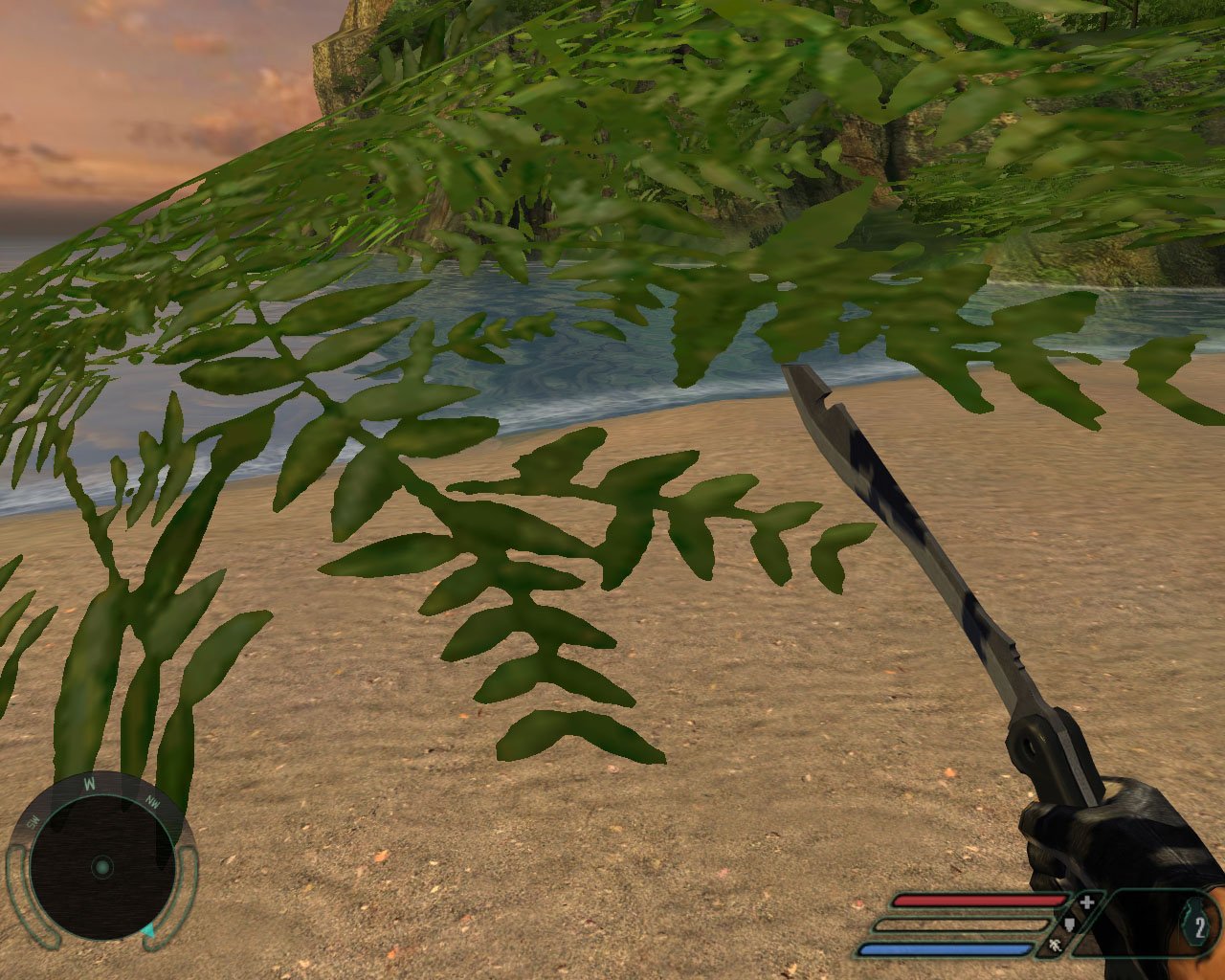
So, usually a texture map is going to be stored with either with 8, 16, 24, or 32 bits (due to byte addressable memory mainly I would assume). An 8bit texture is going to only give you an indexed palette of 256 colors, or 255 if you use 1 of those colors as your transparent color. If we take 2 of those bits and set them aside for transparency (giving 4 levels of transparency) we now get 64 colors that each can be displayed at 4 levels, or even 5 if you reserve one of those colors for absolutely transparent as with the usual scheme. Generally this is still plenty of different colors for a mainly monochromatic thing like a leaf or blade of grass.
However, let's say you need more colors. Let's look at a 16 bit texture, which in most instances is perfectly fine for even high quality graphics. Now we can use an indexed palette like with the 8bit image, and that will follow almost the same principles. Let's look at using a RGB scale instead. Once again, many times people will use 5 bits for each color channel and then the extra bit for transparency [RGBA5551], which gives us the same problems as with the 255+1 color image and aliasing. What if we bump down each color channel to 4bits, and now we have 4 bits for the transparency channel as well (16 levels of transparency) [RGBA4444]. As we've already determined, that's more than enough for the issue we're looking at, but it does cut into your number of possible colors by quite a bit. Perhaps, with a 16bit texture, you'd still be best off to use a static palette, with 2 or 3 bits set aside for transparency? It would probably depend on what type of texture you're working with individually.
So okay, let's look at 24bit textures, which rarely have an alpha channel at all. Here the solution seems very obvious, cut your color channels down to 7bits rather than 8, and then use the remaining 3bits for alpha [RGBA7773].
Generally however, if you want 24bit color textures, and transparency, you just bump on up to 32bits...which once again, may or may not be a waste depending on what type of texture it is your working with. As most TVs and monitors still can not display anything higher than 24bit color (don't let your Windows display settings fool you guys, there is no such thing as a 32bit monitor), some of the newer displays will actually go up to 30bit (10 per channel) and 36bit (12 bits per channel) which is only available to you if you're using HDMI v1.3+ or DisplayPort1.1+. In such a case (which I doubt anyone at all will even consider till the next generation of systems) we could have a 32 bit texture using 10 bits for each color channel and 2 bits for the transparency, or maybe a 40bit (next byte addressable size up) with 12bits per color channel and 4bits for transparency. However, most developers will probably opt to start using floating point based color channels ending up with 48 and 64 bit textures, which will take even more space...
Another interesting point I'd like to point out while I have your attention is that rather than using a 32bit texture for super high quality color representation, why not use a 16bit texture thats twice the resolution or more, yet uses about the same space? When the texture is filtered through mipmapping and various other filters, you probably won't even be able to tell the difference at a distance, yet up close you've got even more detail then before ;)
I guess the point of all this is that today's developers don't seem to care to try and be as creative about such problems as they used to be a decade ago. If you think squeezing all those textures onto a DVD is hard, try putting them on a 16 megabit SNES cartridge... If you spend just a little more time thinking about these kinda things, I'm sure that you'll be able to fit just about as much detail into that 9 gig DVD as you have planned to plop onto that BluRay disc. The same goes for audio (10 gigs my ass, that must be uncompressed or something...have these guys never heard of Ogg Vorbis?).
Subscribe to:
Posts (Atom)